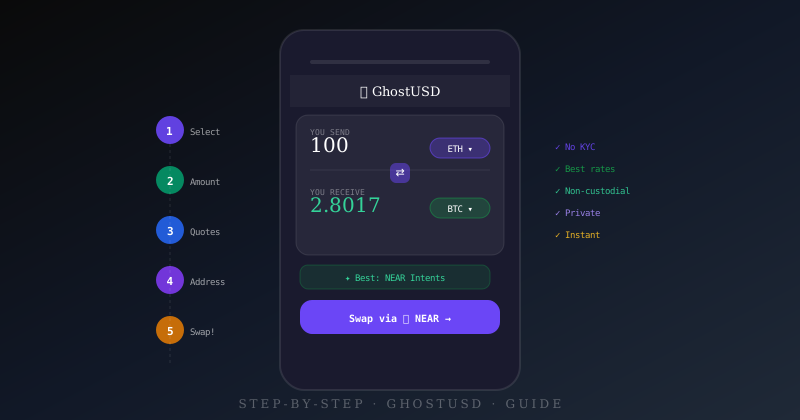
GhostUSD takes under 5 minutes from start to finish. No sign-up, no identity verification, no waiting for approvals. Here is exactly what to do, step by step.
Go to ghostusd.xyz and open the Swap tab
Navigate to ghostusd.xyz and click Swap in the top navigation (it is the default view). You will see the swap interface immediately — no account required, no pop-ups asking for your email.
Select your tokens
Use the "You send" token picker to choose what you are swapping from. Click the token button (shows the current token symbol with a ▾), then search or scroll to find your token.
Then use "You receive" to pick the output token. GhostUSD supports 100+ tokens across Ethereum, Bitcoin, Solana, NEAR, Polygon, and more.
- ETH → BTC: Swap Ethereum for Bitcoin across chains
- USDT → USDC: Switch stablecoins on the same or different chain
- SOL → ETH: Move between Solana and Ethereum ecosystems
Enter your amount
Type the amount you want to swap in the "You send" field. As soon as you enter a valid amount, GhostUSD automatically queries all supported protocols in parallel:
- NEAR Intents — typically fastest, confidential settlement
- HoudiniSwap — enhanced privacy routing
- RocketX — broad chain and token coverage
Live quotes appear in the Live Quotes panel within a few seconds. Each quote shows the exact output amount, estimated time, and a full fee breakdown.
Choose your quote
The Best Rate tab is selected by default, showing quotes ranked by output amount. You can also switch to:
- Fastest — prioritises estimated completion time
- Fixed rate — shows only routes that lock your rate at quote time
Click any quote card to select it. The card expands to show the Transaction Breakdown — protocol fee, gas estimate, and net output. What you see is exactly what you get.
Enter your receiving address
Click Swap via [Protocol] →. A panel appears asking for two addresses:
- Receiving address — your wallet on the destination chain. This is where you will receive the output token.
- Refund address (optional but recommended) — your wallet on the source chain. Used if the swap fails and the protocol needs to return your funds.
GhostUSD validates both addresses in real time — a red border and error message will show if the format is wrong for the selected chain.
Create the swap and send your funds
Click Create Swap →. GhostUSD generates a deposit address unique to your swap. You will see:
- The deposit address to send your funds to
- The exact amount to send
- The time window to complete your deposit
- A transaction ID to track status
Send the exact amount from your wallet to the deposit address. The protocol monitors the blockchain for your deposit and automatically delivers the output to your receiving address.
Done — funds arrive in your wallet
Most swaps complete in 5–15 minutes. NEAR Intents is typically the fastest at 5–10 minutes. You can track your swap status using the transaction ID at any time.
Once complete, the output tokens will appear in the receiving wallet you provided. No follow-up steps needed — the swap is finished.
Frequently Asked Questions
What happens if my swap fails?
If a swap cannot complete (insufficient liquidity, network congestion, expired window), the protocol refunds your tokens to the refund address you provided. This is why setting a refund address is strongly recommended. If no refund address was set, contact the protocol's support using your transaction ID.
Is there a minimum swap amount?
Yes — most protocols require a minimum of $10–25 USD equivalent to cover gas and protocol overhead. GhostUSD will show a "Minimum $X" message on the swap card if your amount is below the threshold.
How does GhostUSD make money?
GhostUSD charges 0% aggregator fee. The protocol fees shown in the breakdown (e.g. 0.5% for NEAR Intents) go entirely to the swap provider. GhostUSD's revenue comes from other means — not from charging you extra on swaps.
Can I track my swap after I close the browser?
Yes. GhostUSD stores a swap history in your browser's local storage. Open the History tab in the GhostUSD app to see all your previous swaps and their current status.